Keyboard Builders' Digest / Tips & Tricks
Modular keyboard using rails
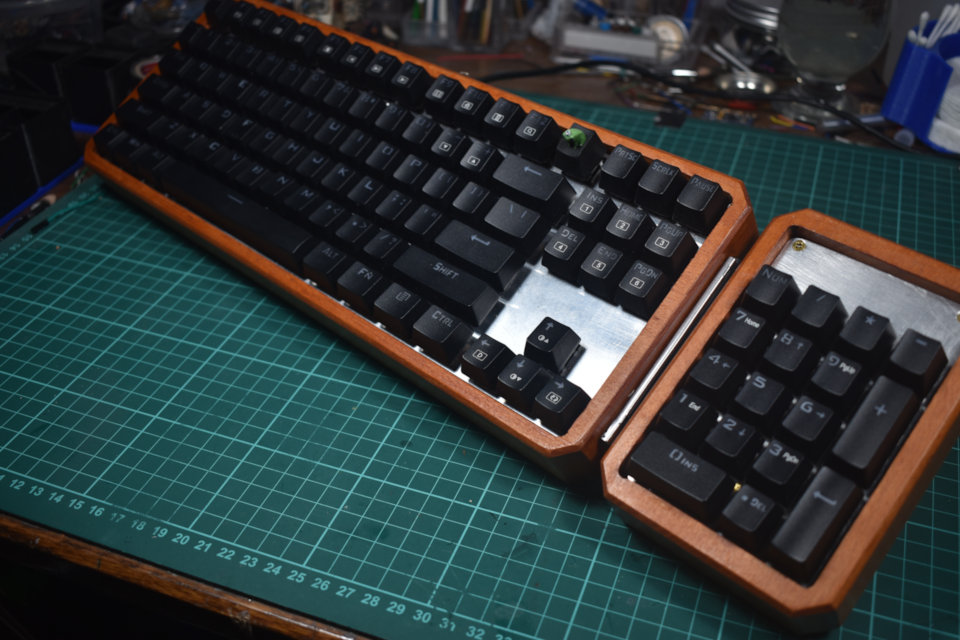
WarhammerBueno designed a keyboard with a replaceable numpad – using a unique rail system.

Published June 18, 2022
Out of 150,000 readers, only 54 make this blog possible. Will you be one of them?
After months of work I have successfully designed a keyboard that allows you to replace the numpad with a different module using a rail on the right side – WarhammerBueno.
Each module has its own Pro Micro, the link system is essentially a USB that connects the module straight to the PC through an internal USB splitter in the main keyboard unit.
Magnets would work too, the author was initially going to use those, but he didn't have access to pogo pins and wanted the module to stay firmly attached to the main unit.
The method I went with was basically using the metal rails from one of those Nintendo switch joycon holders with the pins removed and replaced with a standard female 2 pin socket. The part I designed fits in the rails and has two male pins to interface with the socket on the switch rails.
Currently, the author has a numpad and a macropad module, but he is thinking of making a spacemouse looking module for CAD, as well as another one with a screen.
Some more photos in this imgur gallery.
Published on Sat 18th Jun 2022. Featured in KBD #83 (source).
Related

Map your hand geometry!
This is a quick method to determine key locations customized for your hand geometry. Committed by NCC17O1.
Concrete keyboard
Another concrete keyboard in the making, this time by Chrislybaer. First try failed.
Pocket tripod in action
The newest Kyria with tenting puck and pocket tripod. Posted by cdarw1n.
Keycap dyeing with Rit DyeMore
Dye your keycaps with Rit DyeMore. A tutorial by CrowningKnight.