Keyboard Builders' Digest / Review
Cornix review
The Cornix is a fancy Corne-derivative, designed for the masses by Jezail Funder Studio: pre-built, wireless, CNC alu case, cool tenting. I love it!

Published August 29, 2025

Jezail Funder Studio's pre-built split Cornix (Aliexpress, or from UK-based OZO) looked already mouth-watering in the IC/WIP photos. Upon receiving it, I found it even more appealing in real life.
TLDR; The Cornix is a stunning wireless prebuilt split by Jezail. Sleek design, low profile. As an update of the classic layout, practically a Corne on steroids: alu case with Bluetooth connectivity, featuring three extra keys per half. An ergo split for everyone. The POM Kailh Choc V2 switches are an excellent choice, offering the best of both worlds: low-pro hotswap switches and MX-compatible keycaps. The tenting legs are phenomenal, and Vial support is the icing on the cake. Very easy to customize – the perfect choice if you'd like to go ergo but don't feel like soldering and coding. Barebones version starting at$173$163, the prebuilt one costs$185$175. ($10 off with the KBDNEWS coupon code.) I'm pretty sure this keyboard will be an instant hit.
I saw a lot of potential in this board, so took the time and effort to fully recreate my pretty elaborated keymap – with the intention to turn the Cornix into my daily driver. I've been using it for a few weeks now, so if you're looking for a deeper insight – right down to a full teardown with disassembly photos – check out the full review below.
Disclaimer
Jezail's Frank was kind enough to send me this review unit for free. As I'm always trying to point out: this may introduce all kinds of biases – both negative and positive in my experience. Take everything I write with a grain of salt.

And the deskmat in the photos is the Blue Horizons V2, from Kinetic Labs.
Variants
Four color variants available, barebones or pre-built versions, lots of keycap options too.

As you can see in the other photos, I got the most universal silver version. But take a look at those gorgeous purple and red ones!
Unboxing & Contents
The Cornix came in a simple, no-frills cardboard box, with minimal branding – sitting between protective layers of thick foam:

Contents: The pre-built split keyboard itself with keycaps and switches mounted, a greeting card by Frank in Chinese (with QR codes to some Chinese purchase options and whatnot), a handy carry case, a basic white cable, basic combined tool to remove keycaps and switches, some extra keycaps, alternative switch sample (2x White Rain), and various colorful paper pieces to customize the controller cover. (In addition, a full extra black keycap set, but I doubt you get this by default when ordering the Cornix.)
That said, I'm not sure about the exact contents of the bundle nowadays. I received mine weeks ago, from the first mass-produced batch. (Yeah, as much as I would have liked to publish this piece much earlier, my review schedule has been quite packed lately.)
First impressions, design language
This was love at first sight. The milled aluminum case combined with the frosted acrylic part make a very sophisticated look and feel – relatively uncommon in the niche split scene. The tenting legs are superb, I already loved the all-POM Kailh Choc V2 switches since the split Lego KBDcraft one (although this one comes with PC stem), and the custom LAK keycap set works fine too – with legends reflecting the default keymap (numbers, BL connections). Great attention to detail.

This can be a clean and simple build, with some minimal branding ("JZF") visible only on the bottom and the tenting legs. But you get some colorful cardboard decoration with the bundle, so you can customize the appearance by putting them under the controller covers.

Specs
- Layout: 48 keys (extended 6x3+3)
- Keycaps: dye-sub PBT LAK profile (low-pro MX)
- Switches: Kailh Choc V2 MINI Spring (40gf linear)
- Case material: CNC aluminum
- Mounting: Tray mount
- Plate: FR4, no flex cuts
- PCB: hotswap, matte black
- Tenting angle: 0/6/12/18/24 degrees
- Software support: RMK/Vial
- Battery: 2x650mAh
- Dimensions: 142x91x15(case)/21(keycaps)/24(encoder)mm
- Weight: 2x278g
Layout
48 keys, extending the classic 6x3+3 split arrangement by adding three extra keys to the bottom.
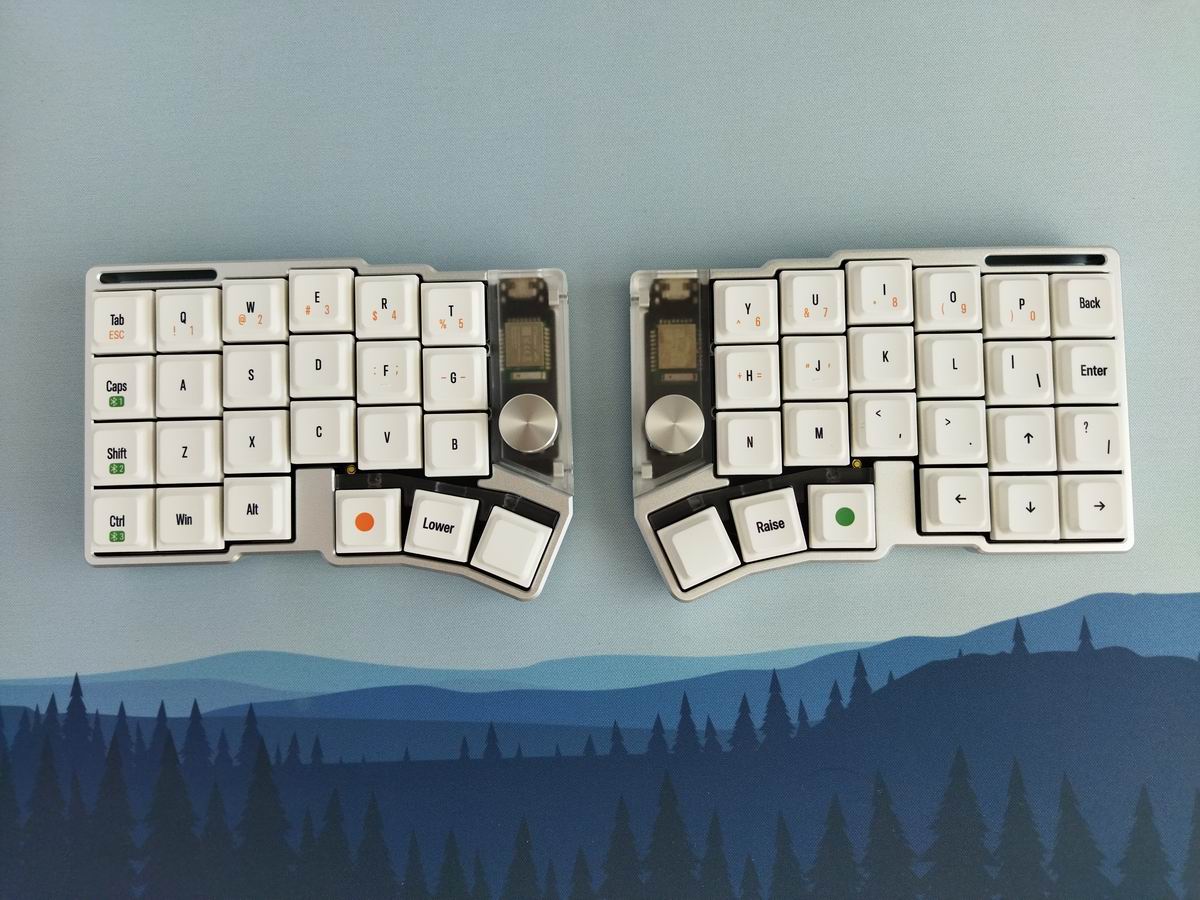
Actually, this benefits not only newcomers to the split scene (easier transition from more traditional layouts or non-split 40% boards), but also me, who prefers over-1U vertical stagger on the pinky columns. You can simply shift everything one key down.

Yeah, 48 keys may be considered already too many by hardcore split users typing on 36-42 keys (or even less). However, this variant is still very compact: lacking physical F-keys, numpad, number row. All you really have beside alphas are a dedicated arrow cluster and the two outer columns.
Build quality, structure, case
Excellent build quality. Perfect. Flawless. Impeccable. Despite being very sleek, the whole thing has a healthy mass compared to much bulkier 3D-printed plastic cases. In addition, this bead-blasted and anodized silver variant is absolutely fingerprint-resistant.

The screws are hidden, so to disassemble the Cornix, you have to remove at least some keycaps first. It seems that this is a prebuilt-first keyboard, aesthetics was more important then easy disassembly. In addition, the controller cover's screws seem tiny and quite special. I doubt many of you'll have the right screwdriver.
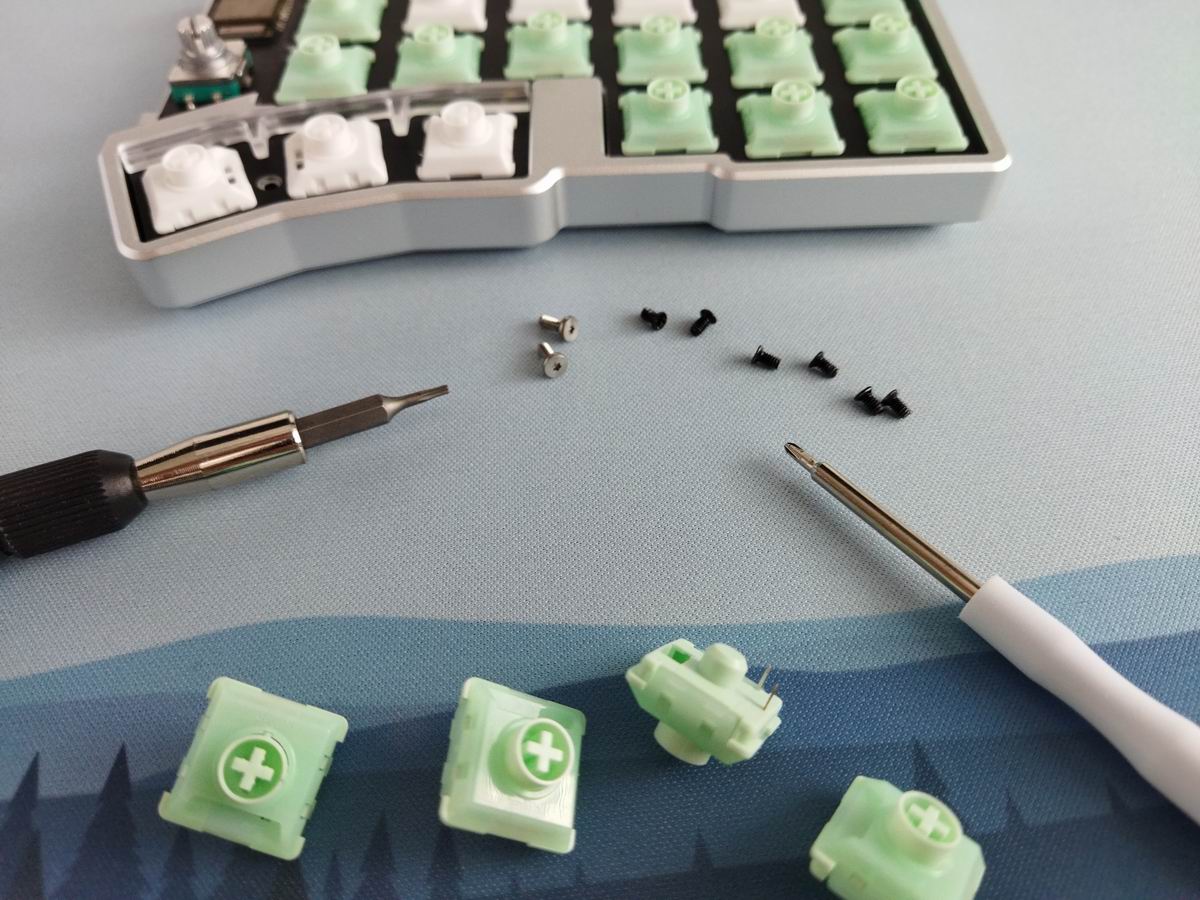
Not optimal from the reviewer point of view, but we are speaking about a prebuilt keyboard, so the majority of customers won't bother with disassembly anyway.
Structure & Mounting
Tray mounting, the plate/foam/PCB sandwich is fixed to the bottom case by six screws. This design results in a more direct typing experience, no softness or extra cushioning like with gaskets and flex cuts.
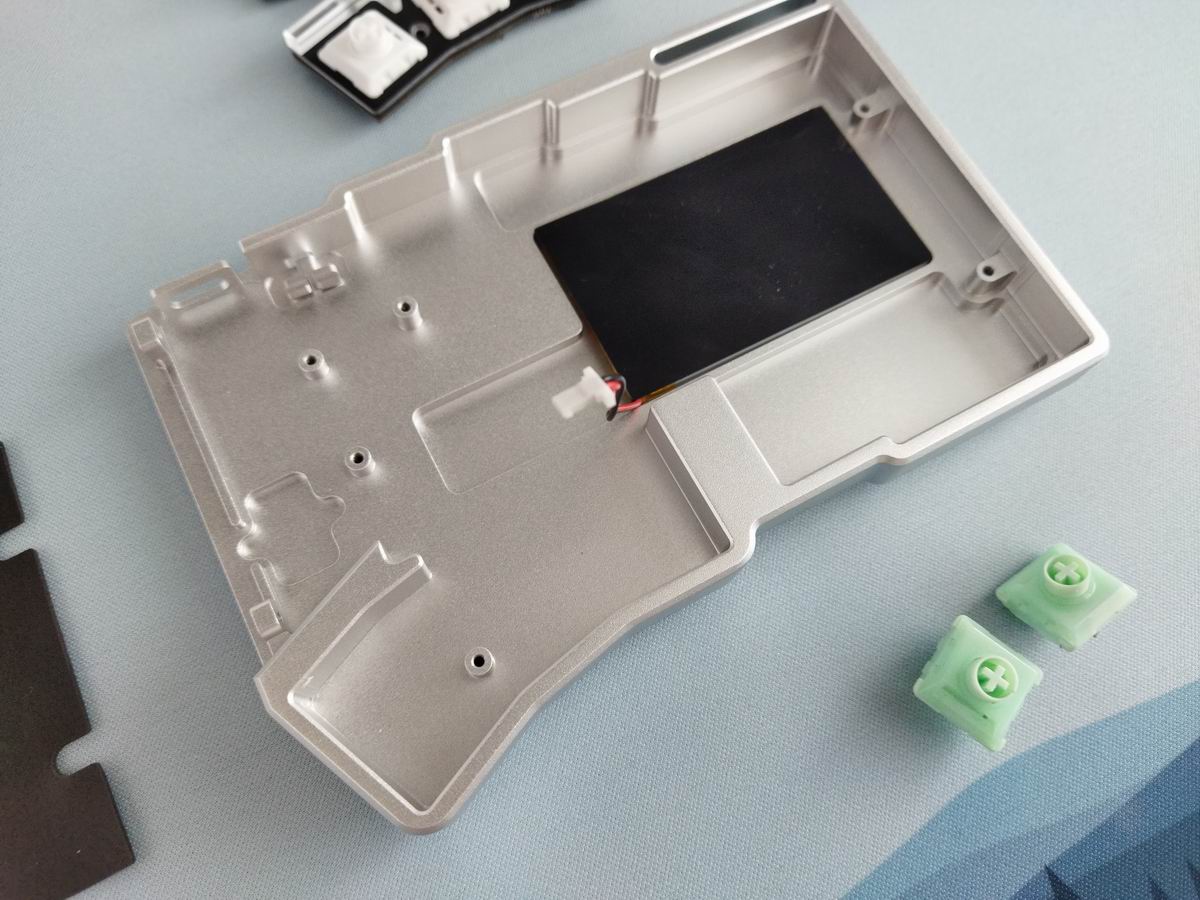
Plate
Matte FR4 plate. No flex cuts, so the typing feel is very direct.

Everything is 1U, so no stabilizers are needed.
PCB
This is a prebuilt keyboard so most of you won't need to get as far as disassembling it – prying the PCB off the plate/foam sandwich plus switches. The 1.2 mm PCB features hotswap sockets and no LEDs, except two indicator LEDs. No flex cuts.


Switches
The Kailh Choc V2 MINI Spring switch (40gf) is an excellent choice. It's mostly POM, not all-POM though, in contrast to the Kailh White Rain – you get some samples of this latter in the bundle, and I had a full set coming with the LEGO split KBDcraft Israfel.

- Actuation force: 40gf
- Bottom force: ?gf
- Total travel: 2.8mm
- Pre travel: 1.2mm
- Top housing: PC
- Bottom housing: POM
- Stem material: POM
If you'd like to experiment, feel free to use the most recent best-selling mechanical switches, or your personal favorites. The PCB features hotswap sockets, so you're not restricted to the factory setup as you can easily swap switches without soldering.
Choc V2 means Choc footprint/pins and MX stem. The best of both worlds: low-profile switches with a much larger selection of MX-compatible keycaps compared to Choc ones. If you think that Choc switch selection is sparse, think again. Or check out Talpkeyboard's or Kailh's recent switch top lists. (August stats coming next week, stay tuned.)
Keycaps
The PBT LAK keycaps are already very usable, especially for something split: a uniform, cylindrical profile with relatively small top surface. This is a custom set, the legends indicate the default Cornix keymap with regards to the numbers, BL channels, and some symbols.

LAK is great for the alphas, but the huge gap and harsh edges make it less optimal for the thumb cluster – at least for me. You can't simply slide your thumbs across the three thumbs keys.
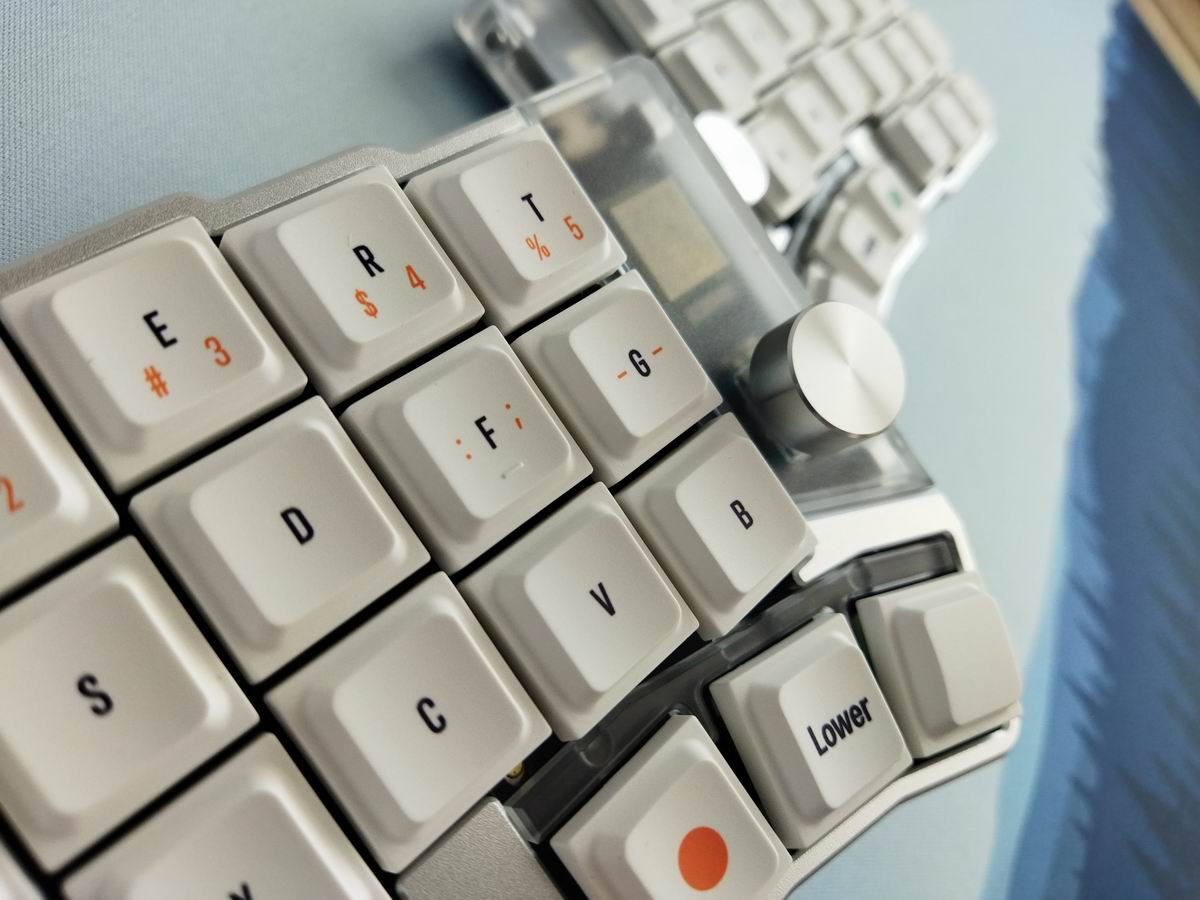
That said, coming from a Glove80 with keywell, I feel that a nice low-pro sculpted keycap set, e.g. my gorgeous MX Lamé from 3dkeycaps, could come in handy.
Or I'm also curious about their updated keycap tilters (the prototype I reviewed was not yet compatible with Choc V2 stems).

With regards to keycap compatibity, the all-1U 50% layout should be widely supported. Mostly by uniform keycaps, other normal sets, but also dedicated split sets of course.
By the way, you get one convex thumb cap by half with the default bundle.

Weight
No fancy weight, just the clean, bead-blasted and anodized bottom. Which is perfectly fine and makes sense. With some branding, and markings for the tenting legs.
Tenting
Speaking of tenting, these legs are superb. I guess these are the same tenting feet you can grab from e.g. Typeractive, only branded, and nicely recessed into the case.
So you can buy this legs elsewhere, but probably won't be able to use them in your build in such a classy way as the Cornix does it.
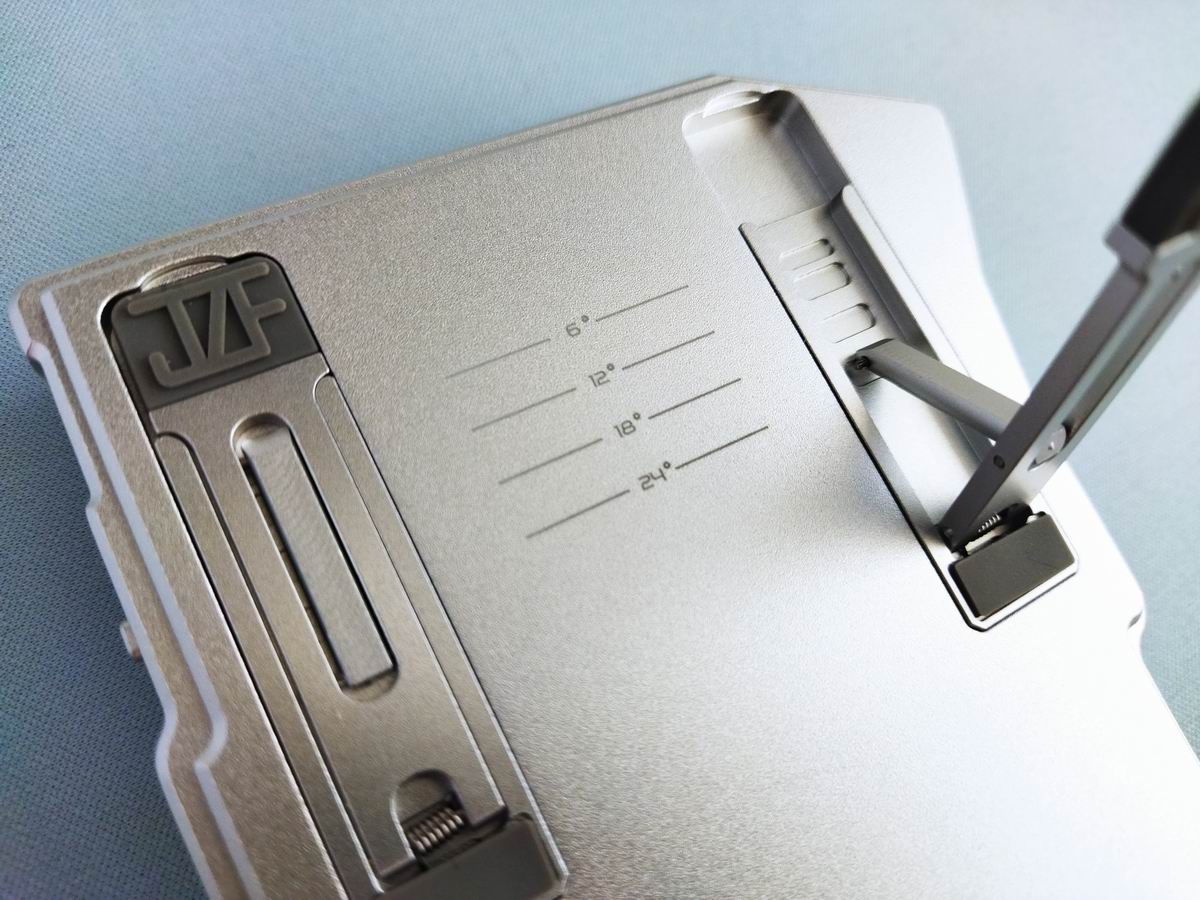
The legs are very easy to set up or collapse, and as already told, there are dedicated marks etched into the bottom case to indicate tenting angles: 0/6/12/18/24 degrees.
The board is very stable, even in its topmost position. Two legs per half – only for tenting, not tilting. You can't go with tilting at the same time, e.g. for a negative typing angle: setting up the two legs differently results in an unusably rocking experience.
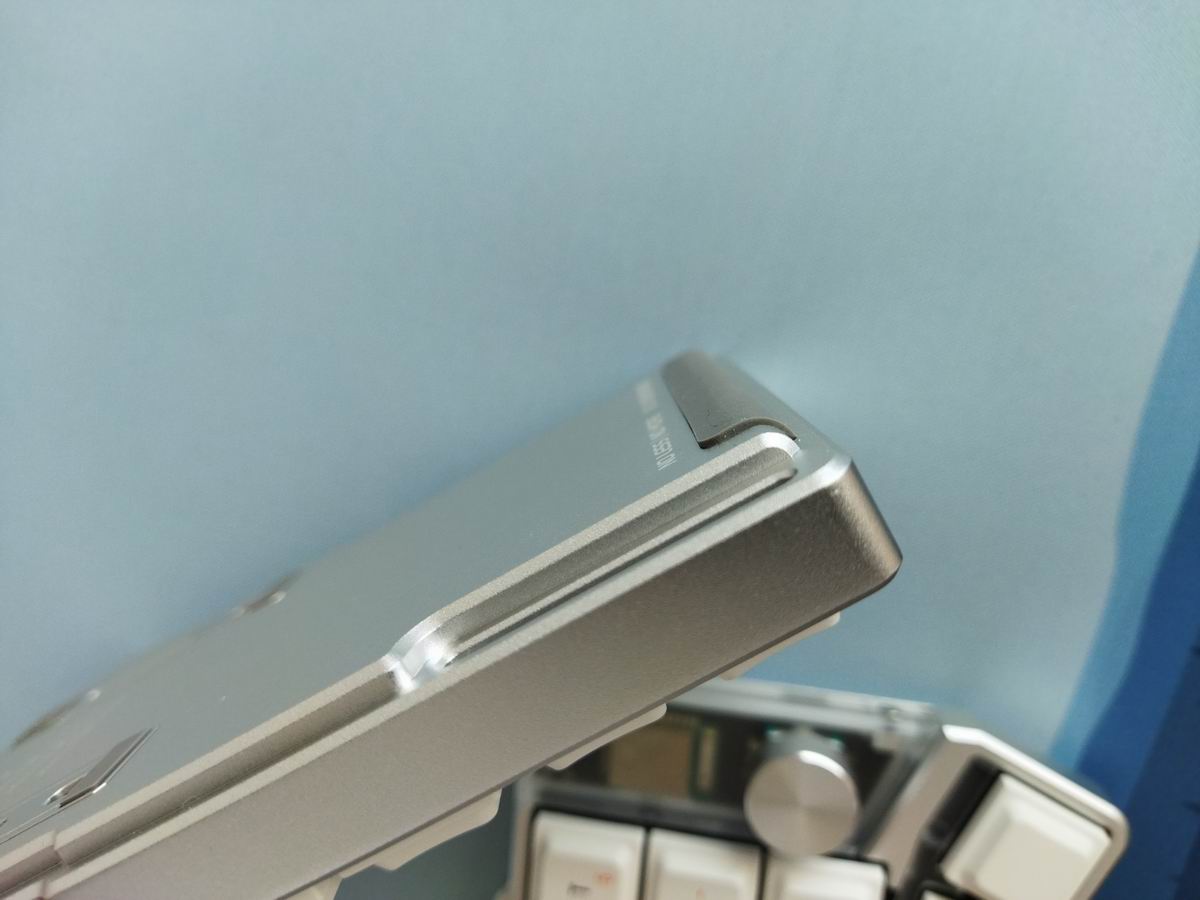
The side bumpons are cleverly placed, covering both the bottom and side, so they do their duty in every tenting angle.
Sound & Sound dampening
Keyboard sound is not really a thing in the DIY split scene, is it? Well, it seems it is now. As it's fitting for a pre-built split in a nice milled case. Definitely not the DIY split sound experience: it's relatively muted, but very clean and nice. I like it a lot.
My other splits, 3D-printed ones with huge XDA caps, are much louder, and rattly. Even the Glove80. Compared to them, the Cornix is a refined precision machine with very sophisticated sound.

One reason for that, other than the aluminum case, may be that we have actual sound dampening layers in the Cornix. Well, the bottom one is partly for insulation, but there's another thin layer between the plate and PCB.
Lights
No per-key RGB. Just some tiny indicator LEDs on both halves, showing connection status and warning about low battery level.

Wireless
The Cornix is wireless (Bluetooth), supporting three BL connections, and featuring 650mAh batteries. The left half is the main device, you can use that one as wired too, but the USB socket of the right slave is only there for charging and reflashing the firmware. There's no cable between the halves.
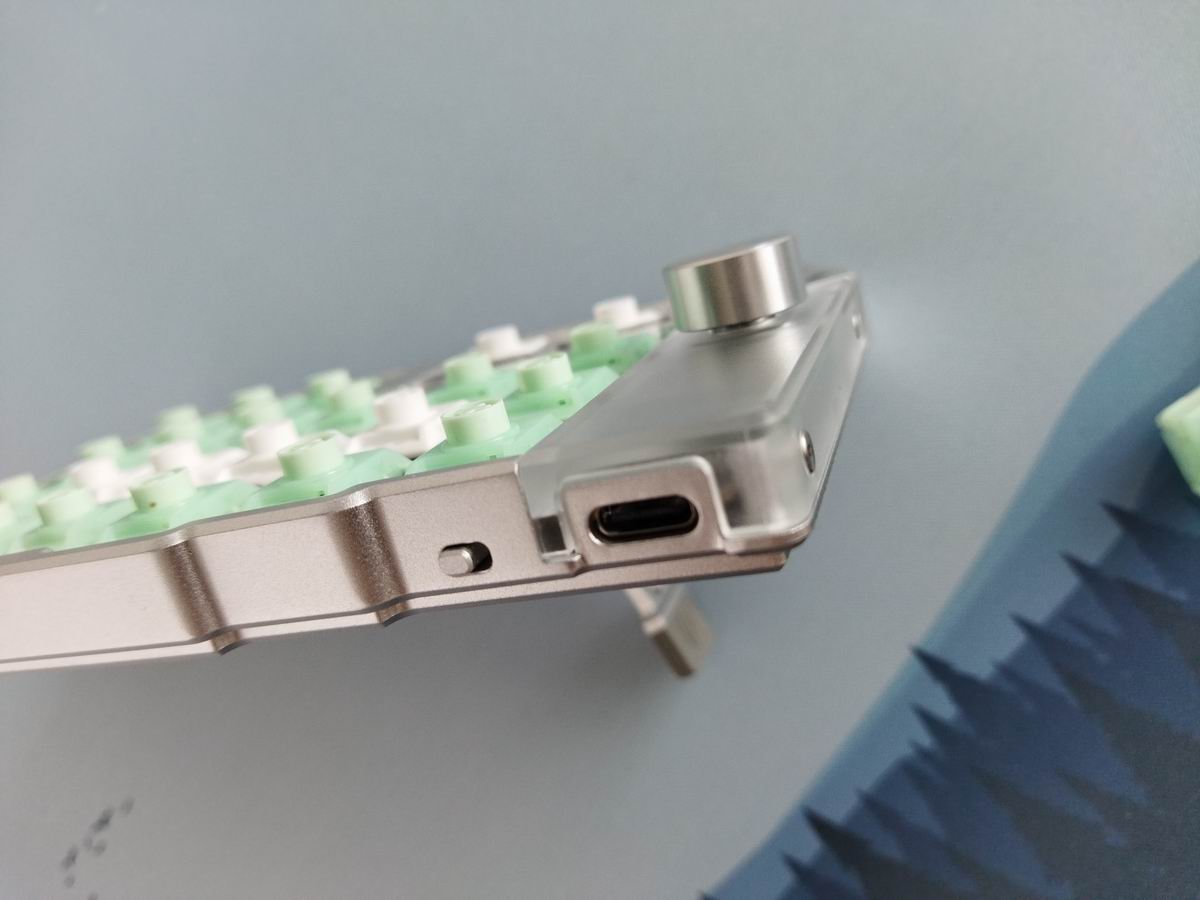
There are dedicated on/off switches on both halves for on the go, or when not in use (however, the board goes into sleep mode automatically). That said, when plugged in, the left one doesn't react to the on/off switch, it stays on and keeps charging, so it's not something to fully disconnect the battery.

And this is important. The Cornix has the CE, FCC, and TELEC certifications, so it should be safe.
However, as a general warning: if you use your wireless keyboards permanently connected, please read this article about built-in keyboard batteries and how to avoid fire – for details, tips, and horror stories.
Basically, keeping wireless boards plugged in constantly leads to accelerated degradation of the lithium battery. You have to follow proper battery care practices. The right half of the Cornix is wireless only, so you can't remove or disconnect the battery.
That said, check the battery for swelling regularly.
Unfortunately, it's pretty inconvenient to get to the battery of the Cornix: removing some keycaps, unscrewing eight screws, etc. You won't check it too often I guess.
Software
Having RMK/Vial support is always nice, but easy remapping is simply a must for the target audience of the Cornix. I mean, users of minimalist splits with small layouts simply NEED an easy way to experiment with keymaps. Luckily, the Cornix was recognized by Vial even before I could consult any manual or product page. Setting up my custom keymap went as usual.
It would be really a missed opportunity to not update your keymap according to your own preferences and workflow, so if the factory settings don't meet your needs, you have the option to customize your keymap very easily.

SpaceFN has been tested and works as expected. This single layer can be a real game-changer, putting arrows, navigation and numbers under your fingertips. But you have much more options with the Cornix.
Firmware update
In its original state, using the Cornix, I found several key combinations which didn't seem to work well together, at least when pressed quickly. A firmware update solved most if not all of these NKRO issues – I've yet to give it another thorough test.
That said, the Cornix lacks proper documentation as of writing this, so I'm sharing both the latest firmware and some instructions.

- Download the firmware: v1.6.99, unpack it to get two UF2 files, one for each half.
- Plug in the left half, and double-press the reset button above the innermost thumb key (see top image).
- Your computer should see a disk drive named Cornix now, as if it were a pendrive.
- Copy/drag the cornix-left.uf2 file to this drive.
- The device should restart.
- Repeat for the right half, with the cornix-right.uf2 file.
Portability
The Cornix is a great board both for your desk and when mobility is your main concern: compact and relatively light. Its wireless features make it inherently portable, no cables needed, and the easy-to-collapse tenting feet aid mobility too. What's even more important: both halves feature on/off switches, so no accidental keypresses and wakeups during travel.

In addition, the Cornix comes with a handy carry case. All in all, it's perfectly suited for on the go.
Conclusion
The Cornix is an awesome pre-built split keyboard from Jezail Funder Studio – as close to the perfect split for me as it gets. Coming in a nice milled aluminum case and with great feel and sound – quite a rarity in the split scene –, featuring hotswap Choc switches, low-profile PBT keycaps, and providing a really great out-of-the-box typing experience. The three extra keys per half make it relatively universal. Vial support is the icing on the cake, for even more and easier customizability. This board should be an instant hit, I can recommend it to seasoned split users as well as newcomers to the hobby.
Pros
- exceptional build quality for something low-pro split
- highly customizable (hotswap Choc footprint, MX stem, Vial)
- the updated physical layout with the additional keys makes a lot of sense (especially for non-English typers)
Cons
- lack of documentation
- no easy way to disassemble the board and check battery health – which could become important after a few years of use
- NKRO issues seem to be fixed with the new firmware, but I have yet to confirm

Price & Availability
Frank was kind enough to offer you a $10 discount with the KBDNEWS coupon code, so the Cornix is available from $163. The official price is $173 (barebones) and $185 (pre-built) – with free shipping from the Jezail Funder Store. Beside the Aliexpress store, an own website and shop is being set up, along with recruiting regional vendors like e.g. jezailfunder.jp.
Metakeebs has some items in stock for a bit less too, not sure about shipping fees though.
- Cornix on aliexpress. Use the KBDNEWS coupon code for $10 off.
- Cornix from OZO Keyboards (UK).
- jezailfunder.jp – the Japanese vendor.
- Cornix IC on Geekhack
- Some documentation
- Cornix ZMK shield by hitsmaxft.
- Blue Horizons V2 deskmat at Kinetic Labs.
Published on Fri 29th Aug 2025. Featured in KBD #198.
Related

Hacktrick
A '70s-style gasket-mounted monoblock split featuring Selectric I keycaps: Hacktrick by Tschibo00.
Wooden monoblock split
This wooden monoblock split by Libano23 features a pseudo-PCB (photolog).
Birdie6 keyboard
u/josandi used MrZealot's ergogen to design this beautiful Birdie6 keyboard.
Custom handwired split
A custom handwired keyboard by llpamies with build gallery.