Keyboard Builders' Digest / Review
Epomaker HE68 Lite review
A very affordable magnetic board punching above its weight: Epomaker HE68 Lite review.

Published May 2, 2026

After the Epomaker RT82 with its retro vibe, I had the opportunity to test the brand's other two models: the pretty unique, typewriter-like Glyph (coming soon), and the magnetic Epomaker HE68 Lite. Here are my thoughts about the latter.
(Don't forget to use the $10 KBDNEWS coupon code, if you like what you see.)
TL;DR: The 65% Epomaker HE68 Lite is a fully built wired Hall-effect (magnetic) gamer keyboard. It comes with an optional wrist strap, and features an injection-molded plastic housing. Clean and simple design, hot-swappable HE switches with MX-compatible stem. Proprietary software full of features for gamers, but no proper mod-tap function for keymap wizards relying on layers. Available from just $40.
Should I buy the Epomaker HE68 Lite? – you may ask. As always, it depends on your needs. In this review, I'll pack in as many facts as possible to help you answer that question for yourself. As you'll see, I've even torn down my HE68 Lite to its core. (You don't have to do this at home.)

That said, before placing an order, the most important thing is to know exactly what you want. Make sure you're aware of your preferences and the features you need – you may as well jot down a nice list –, and check out the full review below for all the details and photos. (There's also an Imgur gallery with all the raw images.)
Specs (and ToC)
- Contents: pre-built board, strap, guide, cable, tools, dust cover
- Layout: 65% ANSI, 68 keys
- Keycaps: double-shot PBT (or shine-through)
- Switches: Epomaker Clear Mag (45gf bottom-out)
- Case: ABS plastic
- Typing angle: fixed 4.5 degrees
- Mounting: Tray mounting
- Stabilizers: plate mount (no screw-in support)
- Plate: milky PC (without flex cuts)
- PCB: 1.6 mm, south-facing per-key RGB, no flex cuts, inherently hot-swappable
- Sound dampening: 5 layers
- Lights: per-key RGB, south-facing LEDs
- Connectivity: wired, USB-C
- Software: proprietary
- Dimensions: 322x120x40 mm (back height)
- Weight: 650 g
- Price: from
$50$40 (coupon code: KBDNEWS)
Disclaimer
Epomaker was kind enough to send me this review unit for free, which may introduce certain biases – both positive and negative, in my experience. Please take everything I write with a grain of salt.
Variants
The board is available in three color variants: Black, White, and Black Red.

If you're into RGB and thus translucent keycaps, the Black and White versions come with these gamer caps for you – and matching straps.
The Black Red one comes with double-shot PBT keycaps, with orange legends. I'm not really into RGB lighting, so I eventually chose this one.
Unboxing & Contents
A nice and informative cardboard box with plenty of stuff inside.

The contents:
- the HE68 Lite, pre-built with switches and keycaps mounted
- quick-start guide and card with QR codes
- ptional strap parts with screws
- braided USB cable
- combined switch+keycap puller
- screwdriver
- 2x replacement switches
- dust cover
First impressions, design language
The HE68 Lite is a simple, affordable, and very light (plastic) Hall-effect keyboard.

Injection-molded case with some cuts here and there to spice up the basic shape. No visible branding, only on the bottom.
One-part case, tray mounting, hidden screws.

I wouldn't say that the HE68 Lite stands out from all the models in a crowded market like the 65% segment, especially visually. Maybe the strap, but we've already seen this solution. That said, this is a decent entry-level model, especially for the price.
Layout
The 65% layout is relatively standard and prevalent. There's no numpad or classic navigation cluster, and the function row is missing as well. However, you still have a full number row, also dedicated arrow keys (snapped to the other keys), and an extra column on the right.

Featuring 68 keys (ANSI US version only), the HE68 Lite optimizes space in the first place. All the functionality of a 100% is there of course, you just have to resort to key combinations and extra layers.

The HE68 Lite doesn't support stepped CapsLock or split spacebar.
The arrow cluster is not offset, and there's no gap left of the arrows either, unfortunately, which can bother some of you touch typers out there when changing between the home row and arrow cluster. When possible, I usually move the arrows (and numbers plus function keys) to the alphas via SpaceFN, so I'm not really affected by this potential issue. If you type the classic way, consider if you would get lost with this arrangement.
Keycaps
The keyboard, at least the Black Red variant, comes with a nice Cherry-profile (sculpted, cylindrical) double-shot PBT keycap set. White on black, plus orange-red accents (Esc, spacebar, Enter).
That said, if you prefer translucent keycaps for RGB lights, the Black and White come with shine-through PBT caps.

Legend consistency is okay, some slightly strange kerning here and there on the mods. Otherwise I like the WoB alphas.

That said, the switches feature MX stems, so – also with regards to keycap compatibility – this layout should be widely supported if you opt for something different. Watch out for the all-1U mods left of the spacebar.
Switches
The Hall-effect switches coming with the HE68 Lite are Epomaker-branded, relatively light "Epomaker Clear Mag" switches.
Indeed, the upper housing is fully transparent, and while the bottom housing doesn't have much function in this regard, it's also translucent (milky white).

Epomaker Clear Mag switch specs
- Type: linear Hall-effect
- Initial force: 25gf
- Bottom-out: 45gf
- Mounting: PCB (2 plastic pins)
- Actuation travel: adjustable 0.1-3.4 mm
- Total travel: 3.4 mm
- Initial magnetic flux: 90GS
- Bottom magnetic flux: 550GS
- Material: POM/PC/PA (stem/top/bottom)
- Spring: 18 mm
- Factory lubing: yes
We are talking about nice light linear Hall-effect switches, very smooth, with moderate wobble.

These switches feel decent, but Hall-effect keyboards are inherently hot-swappable, so you're not restricted to the factory setup. Check out the current best-selling magnetic switches, or feel free to use your personal favorites lying around.
Build quality, structure, case
The HE68 Lite features an injection-molded plastic case (ABS). Very basic structure: one-piece case with tray structure.

If you're concerned about fingerprints, the White version is the safer choice. Black bases are generally fingerprint magnets, attracting and highlighting smudges very easily, but also each and every dust particle.
Despite being relatively light (650 g), it doesn't move during gaming sessions, not to mention less demanding office or home use.
Typing angle: non-adjustable, fixed 4.5 degrees.
Disassembly
The hidden-screw design is not my favorite, but the disassembly is straightforward.

Start by removing these 16 keycaps depicted above to access the eight screws fixing the plate/PCB sandwich to the case poles.
While this is a pre-built model, not designed with frequent disassembly in mind, I'm glad the HE68 Lite is pretty easy to disassemble.
Structure & Mounting
The HE68 features tray mounting, meaning the plate/foam/PCB sandwich is screwed to eight poles of the bottom case. No gaskets.

While this structure should result in a direct/hard typing experience in theory, as expected from a keyboard designed for gamers, the HE68 is surprisingly pleasant to type on – I prefer a softer typing experience in general, and this model is relatively close to my preference.
Plate
The plate is a milky PC one without any flex cuts. Relatively resistant to the scratches made by my favorite Kemove P10 switch pullers.

Stabilizers
Plate-mount stabilizers, no screw-in stab support – the PCB doesn't feature holes for PCB-mount stabs.
PCB
The nice matte black PCB is 1.6 mm thick, and it's part of the plate/foam/PCB sandwich, screwed together. It features south-facing per-key LEDs. There are no flex cuts, and there's no need for hotswap sockets either – HE switches are inherently hot-swappable.

As already mentioned, the PCB lacks the necessary holes for screw-in stabs.
Bottom weight & Feet
No bottom weight, a one-piece injection-molded case with some design patterns and a sticker.

No typing angle adjustment. Four small bumpons in the corners.
Sound dampening & Feel
PORON sandwich foam, IXPE switch pad, PET sound-enhancement pad, switch socket pad (even though there are no hotswap sockets), and a last bottom foam in the tray.
Despite the tray mounting, non-flex-cut PC plate, and non-flex-cut PCB, the HE68 Lite still provides a relatively nice and softer typing experience.

The sound of the keys is somewhat heterogeneous, depending on the distance from the nearest screw/pole. That said, it's mostly thocky. Honestly, after comparing various boards side by side, I'd say only the Evoworks Evo75 is thockier of all the boards around my desk. Surprisingly nice sound in this price range, at least to my ears.
I'd say that the out-of-the-box typing experience is about average, this model definitely punches above its weight.
Strap
The board comes with an optional wrist strap. Good news: it's just large enough to fit my adult male hands – in contrast to that of the similar Dareu COOL60.

This is an extra, an optional feature, as the board comes with a rubberized placeholder plus separate parts for the strap in the box.

I'm not sure about the practicality, I deem this feature more of a decoration element, but it's a nice touch to the classic case. In contrast to other boards, there's no protruding plastic part to attach the strap, but a more heavy-duty piece that feels metal.

In addition, it seems that you can get replacement straps in various colors – these look compatible, pretty much the same design.
RGB lights
The board comes with per-key RGB (south-facing LEDs), no other ambient or decoration light.

If you're really into lighting effects, go with the translucent PC keycaps (Black and White variants). The Black Red's double-shot keycaps don't let light through.
The switch housing is transparent, so already good for lighting (no dedicated light diffusers though). If you prefer something else but still value lights, there are other fully transparent popular HE switches.

The board offers about 20 preset animations – from subtle ambient glow to vibrant full-spectrum animations, you can fine-tune colors, brightness, and modes to match your mood and setup. Both via the driver and hotkeys.
Toggle: FN+Del, animations: FN+PgUp, colors: FN+PgDn, brightness and speed with FN+arrows.
Connectivity
The HE68 Lite is a wired keyboard, so no wireless Bluetooth or 2.4GHz connection options.
The USB-C socket is located on the left rear part of the case (when facing the board in a typing orientation).

The accompanying cable is decent, a braided black one that matches the case.
Software
Hm. Hall-effect keyboards usually come with proprietary software, and the HE68 Lite is no exception. To be clear: no QMK/VIA/Vial support.
There's the huge (100MB+) Epomaker Driver 3.0 that you have to download and install.

The software's interface is relatively intuitive, however, we've seen more user-friendly solutions out there. E.g. when swapping letters, you have to confirm each change, but the interface displays the changes only on hover.
Setting up a custom base layer is definitely possible, however, the mod-tap function is very limited. There's a single FN layer, there are "system keys" you can't change (the red ones in the screenshot below), and FN is a "function", not a keycode – not usable as mod-tap, meaning you can't set up SpaceFN. For those new to it: SpaceFN is an easy-to-access layer that's crucial for many users, letting you assign arrows, navigation keys, and numbers right under your fingertips – no need to move your hand to the arrow cluster, for example.

Gamers will probably discover all the specs and features aimed at them:
- SOCD, DKS, MT, RT, TGL, macros
- 0.01 mm adjustable actuation
- 8K Hz sampling (1.25 ms latency), adjustable

And of course the lighting section – with about 20 animations. Also some community features to share keymaps.
Compatibility
Windows, Mac, and Android support according to the specs. There's no physical switch, the HE68 Lite automatically switches to the correct OS mode. (I had no problem on Windows, but that's the only OS I tested.)
Portability
The HE68 Lite is a great keyboard if portability is your main concern.
The relatively small 65% footprint already helps a lot, it will most likely fit in any backpack, but it's also very light with its 650 g. Actually, it feels even lighter – ideal for travel.
I'm not sure about the wrist strap, but you have that, too.
Comparison
I've reviewed many magnetic gamer boards, some even in this popular 65% form factor.
If you need something magnetic for gaming, the Luminkey Magger 65 HE, the Dareu Cool68, MoeeTech's Glitter65 HE, the Syntech Chronos 68, or the entry-level Kemove TMKB T68-C have been covered. The Magger and Chronos are aluminum.

60% models are close relatives too. I've recently reviewed the fancy aluminum IQUNIX EV63 HE and the light and portable (plastic) Dareu COOL60 HE – already mentioned because of the similar strap. But the mechanical alu 60/65% Chosfox Fox65 with slider and split spacebar is worth checking out as well.
Maybe also the Elytra if you're open to split boards. Or the Lego KBDcraft Israfel if split ortho is an option.
Conclusion
The 65% Epomaker HE68 Lite is a very affordable wired Hall-effect (magnetic) keyboard with an optional wrist strap. Compact, light, and portable design in a plastic case. Given the decent magnetic switches, the MX keycap compatibility, hot-swappability, and all the magnetic gamer features, I can recommend this model for consideration if you're looking for something in this form factor. The target audience is obviously gamers on a budget, so keymap wizards will have to resort to third-party solutions to implement e.g. SpaceFN. That said, this is a decent entry-level HE board, clearly punching above its weight.
Pros
- light and portable design
- highly customizable
- specs and features with gamers in mind
Cons
- proprietary software has its limitations

Price & Availability
The Epomaker HE68 Lite is available at epomaker.com, at the moment for $50 $40. Don't forget to use the KBDNEWS coupon code to claim your $10 discount.
- Epomaker HE68 Lite product page
Published on Sat 2nd May 2026. Featured in KBD #211.
Related

Whitefox Eclipse review
The WhiteFox Eclipse by Project Eclipse is the latest take on this classic model: a prebuilt 68% board with magnetic assembly and a whole ecosystem of modular cases. (Now with 10% off!)
Pome76
As standard as this row-staggered keyboard looks like, Jamie Ding's Pome76 behaves like a "unibody ergo". How?
Micro Journal Rev.7: Kindred Gift
This latest revision of Un Kyu Lee's Micro Journal features a paper-like display and a more traditional keyboard.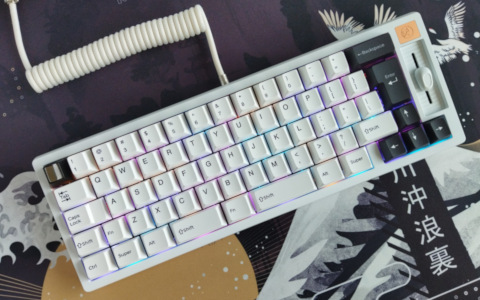
Chosfox Fox65
I reviewed the amazing Fox65 by Chosfox x Masro – a versatile keyboard packed with features, and layout options including ISO and split spacebar support for those who prefer these. E.g. me. ;)