Keyboard Builders' Digest / Tips & Tricks
Best keyboards of 2025 – a personal top list
My favorite keyboards from those I tested in 2025 – in a couple of made-up categories. :)

Published December 24, 2025

(PSA: This is probably the last post of 2025. Happy end of the year to everyone, whether you're celebrating holidays, just chilling, or doing your own thing! Thanks for being part of this journey. Stay awesome!)
Somehow, I’ve ended up doing my longer-format keyboard reviews weekly or every other week for the last two years. That's quite a sample, so I had this idea to put together a year-end summary.
As subjective and biased as this may sound, I thought it would be useful to wrap up the year with my personal top picks and highlight some great keyboards in a few made-up categories like fanciest design, funniest keycap set, best typing feel, most affordable ones, etc. :)
Discussion over at r/mk. Feel free to share your thoughts.
Best of the bests
Putting this category at the very end could have been better from a strategical point of view, but anyway, as a TL;DR, the keyboard project I loved the most in 2025 was – da-bum-tss:
- the Cornix by Jezail Funder Studio. A pre-built split in a quality CNC-milled aluminum case, with great typing feel thanks to the all-POM Choc V2 switches – a ready-to-rock ergo split without the hassle of github, PCB manufacturing, case printing, etc.

Haha. Yeah, I know. Some of you may be frightened by the sheer look of a split keyboard. Still, this one became my daily driver right after the review (and I'm still using it every day), so picking it for the top spot was a no-brainer.

My current Cornix setup (photo above):
- The stock all-POM Kailh Spring MINI Choc V2 switches are stunning for something low profile.
- I'm using the slightly translucent black resin MX Lamé caps from 3dkeycap. And some other colors and textures for special or not-really-used keys.
- Max tenting at 24 degrees, my lower arms resting on the arm rests of my chair.
It's not perfect, I had to update the firmware and have to restart it like once a month when it goes crazy for some reason, but it's probably my fault: most likely I just end up getting stuck on a layer that I don't recognize and can't get back to my base layer… :D
Best typing feel
For some weird reason, pleasant typing feel has something to do with glitter: Glitter65 and Evo75 Nebula with micro-glitter at the two top spots. :)
- The 65% MoeeTech Glitter65 HE – the pre-built one with the lightest 35gF ProSilk switches. Despite the plastic (polycarbonate) case, it was a real wow moment when I first started clicking and clacking on this one. So soft and smooth and creamy – zero scratch and minimal wobble! (Again, I'd like to stress that I'm talking about the ProSilk switches. I liked the other two variants less, with the silent one having considerable wobble.) I built another Glitter65 with the heavier switches of the brand and couldn't reproduce the same experience.

- Evoworks Evo75 – Quality shines through in every aspect of this keyboard. It became my reference instantly when it comes to typing feel of 75% boards.

- Surprisingly, I'd put the Cornix at the third place here as well. Pretty unexpected from a low-pro split. (Although the Choc V2s are much better than the V1s, at least in my opinion.)
Most fun build
- Womier ERA75 – putting about 150 tiny stickers in the intricate carvings may sound annoying at first – a real torture for some –, but it's fun. Okay, you probably need to be a certain personality type for this.

When writing the review, I had to rush the sticker application so the write-up could go live sooner, which is a shame — I really enjoyed the process and would happily do it again, just at a slower pace.
Most fancy design
There were a handful of contenders for this category, like the ERA75 for its carvings and stickers (above), the Dry Studio Battleye with the touch screen inside a rotary knob, plus its patented legs, etc. That said, the winner in this category iiiis:
- The GravaStar Mercury HE for the hand-painted case, the crazy keycap set, and the uniquely molded aluminum case of course, featuring the distinctive alien legs. Too much visually for some people, but I liked the overall design and bundle. (By the way, if there was a 2024 top list, the non-HE Mercury K1 Pro could have ended up as the winner in the Best typing experience category. Those GravaStar-branded linear switches were excellent.)


OK, let's feature the Battleye as well:

Cutest keycap set
- KiiBOOM Phantom81 – this board was instantly grabbed by my daughter, so I haven't seen it since the review. Most likely because of the silly froggy-themed keycaps. I couldn't even decipher the deep symbology she recognized immediately.

If we also consider other attributes, not just the fun factor, I have to mention:
- the KAP Generation set I received from MonacoKeys. Great colors, great quality.

- the Viking Antiques Thor Copper set from Awekeys – I wanted the rune-only set, but it was out of stock so went with the runes-as-sublegends variant. Surprisingly, I love the feel and texture of this one a lot.

- I love the colorway of the double-shot set on the Battleye:

- the dye-sub set on the NPKC RO75 – something muted, nice balance between color groups and materials: translucent accents.
- and yeah, the borderline unreadable pudding-style Mercury caps as well.
- And of course the MX Lamé caps from 3dkeycap, but it's not for everyone as it's a blank low-pro set, more for splits.
Best budget keyboard
I had the opportunity to test some really affordable options. Using the KBDNEWS coupon code, you could grab some boards in the 30-40 USD range.

- The wired 75% Dierya DK81E – $37 with the KBDNEWS coupon code.
- The 60% Hall-effect Dareu COOL60 – $42 with the KBDNEWS coupon code.
- But also this year's very first review: Kemove TMKB T68-C – a 65% Hall-effect board, just $30 as of writing this.
Mostly plastic in this range of course, but often great starting points. And what about aluminum cases?
- Womier SK71 Pro – aluminum top and bottom, plastic middle layer – the most affordable mostly aluminum 75% for $85.
- Redragon Eclipse K720 Pro, full aluminum 75%, for $90.

Best classic layout
Beside the Cornix of course, which layout-wise is close to perfect for my taste, there were some other cool boards with more classic layouts. That said, I'm always excited about split spacebar options:
- Split spacebar: the caseless Lexicon, or the Womier SK71 with a PCB supporting ANSI/ISO variants, plus a split spacebar (though with extra plates, and the split one has been out of stock for some time).

- Arrow cluster. Having it offset makes a lot of sense in my opinion (Dierya DK81E), but most 65 and 75% have at least a gap left of the arrows.
Best features
- VIA/Vial support - At this point, custom firmware honestly gives me a knot in my stomach. VIA/Vial's features are sufficient for 99.9% of people, and you don't have to install anything.
- ball-catch opening: NPKC RO75, KiiBOOM Moonshadow V2, Evo75. In the summer, after reviewing multiple boards with this structure, I thought this feature would catch on. It made disassembling these boards so much easier.

- leaf springs: Evo75, Battleye (also the Weikav Record Alice from last year, despite the buggy firmware). Add these to instantly elevate your keyboard to the next level of sophistication.

- hotswap encoder: ERA75 – a surprisingly useful feature for those who think they need a knob, only to realize later that an F13 key makes more sense. ;)

- magnetic dongle compartment lid: Womier SK71 Pro. I liked this one. Cute and useful: no more lost or mixed-up wireless dongles.

Honestly, I don't think many other features make much sense: displays, encoders, per-key lighting, etc.
That said…
Coolest unnecessary feature
I can't help but create a dedicated category for the best overengineered part:
- Alien legs of the GravaStar Mercury boards. The construction is surprisingly sturdy, and the integrated lighting is the icing on the cake, but still… Probably the most l'art pour l'art thing I've ever seen in keyboards.

In contrast, the Battleye's fancy patented legs have several stages at least.

Honorable mention: the detachable (pogo pin) TV screen of the Epomaker RT82 (review in January).

Best keyboard accessory
Well, this was the single accessory of this kind I reviewed in 2025 I guess, but anyway:
- The Clackify keyboard stand. It's a really useful stuff if you're juggling with close to 100 boards on and around your desk… I need another dozen of these… :D

Best mouse?
Not really my field of expertise to put it mildly, but this year I received some fancy mice from GravaStar, Dareu, Angry Miao (review later), and also 8BitDo.
- GravaStar Mercury X Pro
- 8BitDo Retro R8 - not reviewed -, a companion for their retro keyboard.
- Dareu A950 Wing
- Angry Miao Infinity Mouse. Hotswap battery, futuristic design? If the number of co-workers gasping in awe is any indication of the quality and usefulness, than this is the winner.

That said, this was not a ranking, rather a timeline.
These mostly feather-light peripherals are probably crucial for gamers, but honestly, after every single review, I went back to my trusty old (15 years old) basic wired IBM mouse (office) and a cheap wireless noname one from Aliexpress that is falling apart.
It seems that I need more heft and resistance to handle all the fine movements. Maybe it's just my amateurism and non-gamer approach, but I hate when a mere click moves my cursor. (And I end up clicking something else than intended – annoying when making pixel art.)
---
That's it folks, these were my favorite keyboards from this small sample I've reviewed during 2025.
Thanks for reading, and thanks to all the shops and designers who have sent me keyboards. Keep up this good habit! :D
See you next year. I'm going to continue with boards like the Epomaker RT82 featuring a mini TV, and also the Elytra by Elimkeys – that reminds me of the Cornix, just with a horizontally staggered layout. Maybe the Jiffy SP75, a real JFS product, or the Go60 by MoErgo. And then testing some customization services as well: starting with designing a custom keycap set via Aula's configurator, and putting together a project for JLCPCB/JLC3D as well.
Take care!

Published on Wed 24th Dec 2025. Featured in KBD #204.
Related

KBDcraft Lilith & Lilin
Lilith and Lilin are two LEGO-compatible keyboard models by KBDcraft, working together or on their own.
Redragon Eclipse K720 Pro review
The Redragon Eclipse K720 Pro is a 75% wireless gamer(?) board with pretty impressive features for the price: CNC alu case, display, knob, cool decoration lights.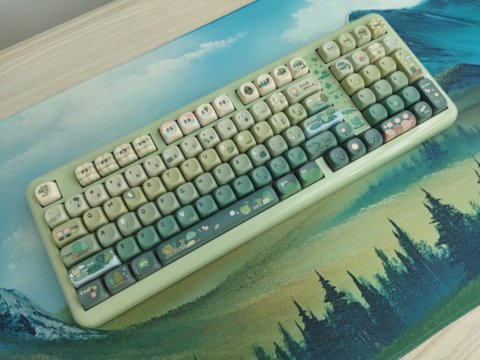
KiiBOOM Phantom 98 Lite review
I reviewed KiiBOOM's Phantom 98 Lite, a cute wireless keyboard with 1800-ish layout and the silly froggy keycap design.
Ergohaven Planeta review
The Planeta is a clean and simple monoblock split keyboard by Ergohaven – with piezo speaker.