Keyboard Builders' Digest / Review
Redragon Behemoth K724 Pro review
Redragon's tri-mode wireless Behemoth K724 Pro is a 75% keyboard with display and rotary knob.

Published March 16, 2026

Let's continue this 75% keyboard series with one of the most affordable 75% wireless boards that have crossed my desk: after the aluminum Eclipse K720 Pro, here is the similar but plastic Redragon Behemoth K724 Pro. With full disassembly and teardown.
TLDR; The tri-mode wireless Redragon Behemoth K724 Pro is a fully built keyboard coming in a plastic housing. It's a very affordable mechanical keyboard ($63 with the KBDNEWS coupon code) with OLED screen, rotary knob, per-key RGB lights, beautiful double-shot keycap set, and decent linear switches. Gaskets, flex cuts, and lots of sound dampening layers, for a moderate softness and volume regarding typing experience. The hotswap PCB and MX-compatible switches make the board somewhat customizable despite the proprietary software. All in all, the K724 Behemoth is a nice offer for those on a budget – not for keymap wizards though.
As you'll see, I've eviscerated the K724 to the very core as usual. Check out the full review below for all the details and full photo gallery on Imgur revealing its internals as well.
Disclaimer
Redragon was kind enough to send me this review unit for free, which may introduce all kinds of biases – both negative and positive in my experience. Take everything I write with a grain of salt.
Unboxing & Contents
The outer cardboard box of the Eclipse K720 Pro is pretty fancy , and there's a more puritan but still silvery inner cardboard box too.

Contents:
- The K724 Behemoth Pro, pre-built with switches and keycaps.
- Quick-start guide, Redragon sticker pack.
- 2.4GHz receiver (compartment in the case)
- simple USB cable (90 degree connector)
- basic combined tool to remove keycaps and switches
- 4x spare switches (no extra caps for Mac)
Variants
The K724 comes in three color variants: the same matte black plastic top case, but with three different kinds of keycap sets, and matching bottom cases.
I opted for the "Black & Green" look, which comes with a teal keycap set and a matching dark teal bottom case color. There's also a gradient set with translucent front legends, and also a black one with translucent legends on top – for Canadian customers only, at least according to the note on the product page.

In addition, there are two switch options: Mint Mambo (40gF linear) and the currently unavailable Dragon Chant.
First impressions, design language
The plastic Eclipse K724 is very similar to the aluminum K720 in many ways: shape, layout, etc.

The Redragon logo on the left side of the top case can be a bit intrusive, but otherwise I like this masculine and authoritative design and aesthetics, a relatively simple shape spiced up by some nice cuts and rounded corners.

It's hard to stand out in such a crowded market like the 75% segment, and the K724 Behemoth apparently tries to achieve this via the colorful OLED screen, rotary knob, and the aggressive cuts here and there.
Specs
- Layout: 75%, 81 keys
- Keycaps: double-shot PBT, a high, sculpted, spherical profile
- Switches: Redragon branded Mint Mambo linears
- Typing angle: 3 degrees + two-stage feet
- Structure: gasket mounting
- Stabilizers: plate mount (no screw-in stab support)
- PCB: hotswap, south-facing per-key RGB
- 1.41" screen
- rotary knob
- Connectivity: wired, 2.4G wireless, Bluetooth
- Software support: limited proprietary software
- Battery 4000mAh
- Material: plastic
- Dimensions: 13.19 x 5.55 x 1.46 inches
- Weight: 1.190g (vs the 1,592g alu K720)
Layout
The 75% layout is pretty standard. It means no numpad and no classic navigation cluster layout either, however, you have arrows, function keys, full number row, and part of the classic navigation keys.
It's a relatively compact design (ANSI), featuring 81 keys, optimizing space while ensuring that all essential functions are easily accessible for new users transitioning from e.g. a fullsize keyboard.

Many 75% keyboards feature a few less or more keys. The 75% K724 Behemoth Pro, with its 81 keys, is not cramped at all. The arrow cluster is easy to locate when touch typing: there's not just the little gap on the left, it's actually nicely offset the 1800 style – you don't get lost when changing between the home row and arrows.

In addition, the K724 retains the gap between the F-groups – sometimes sacrificed by similar boards. A bit narrower, but definitely noticeable.
The extra column on the right consists of four keys.
Keycaps
The "Black & Green" keycap set is rather teal, but it looks really nice. It's a double-shot PBT set – the Redragon website is shy about this fact for some reason.

I'm not entirely sure about the keycap profile, maybe somewhere between MDA and SA, but let's only say that it's a sculpted, spherical one, relatively high. With tiny dots indicating homing keys.

The legends are a bit too large for my taste, but nice elegant lines. They resemble SA legends, but finer.
Legend consistency is okay. Actually, I'd say it's great in general, with very few exceptions like Del vs PgUp, or 7 vs 8.
With regards to keycap compatibility, the 75% layout should be widely supported if you opt for something different.
Switches
The switches are fine too, Redragon branded light linear switches in a calm light rose/green housing, with a more vivid green stem. I'd say that the wobble is average and acceptable, however, it's amplified by the high keycaps.

Data on this Mint Mambo switch is sparse:
- Actuation force: 40gF
- Pre-travel: 2.0mm
- Total travel: 3.6mm
The switches feel decent, but the PCB features hotswap sockets anyway, so you're not restricted to the factory setup at all. Check out the trending community-favorite switches, or feel free to use your personal favorites lying around.

Maybe it's the plastic case, but I feel that this setup would work better with silent switches.
Build quality, structure, case
This board is relatively light, as it is expected from a plastic case case. 1,190 g to be exact. Almost half of my heaviest 75% keyboards, but still not too light. It won't move around during a gaming session, not even mentioning less demanding jobs.
The build quality is decent. The whole thing feels massive for a plastic board, without being overly sophisticated – which would be just out of character with a gamer board like this model.

Typing angle: default 3 degrees, plus two-stage feet.
Disassembly? I've been really spoiled by all the easy-to-open ball-catch keyboards, but easily managed to disassemble this Redragon too – at least the screws are not hidden.

Just turn over your keyboard, and there will be 8 screws you have to remove.
Structure & Mounting
The K724 Behemoth features gasket mounting (the gaskets are attached to the plate), however, this structure differs a bit from other gasket solutions as it uses a much harder material than usual. So I'd say gaskets here have a limited effect. Delivering a crisp, very direct, clean typing feel, so I can't really feel that much flexibility or softness – the general hallmarks of gasket mounting.

Plate
The plate is fully transparent PC, which is an uncommon but nice choice. In addition, the plate features flex cuts for a softer typing feel.

Plate-mount stabilizers, which work very nicely, actually. That said, they are the same wobbly stabs we've seen on the K720. There's a huge difference though: there was something wrong with the K720 stabs for sure, but these stabs on the K724 provide a very nice typing feel despite the plate cutout being too large again, resulting in the stabs moving on the horizontal plane without the keycaps. In action, however, with keycaps keeping them in place and anchored to the switches, you can't tell there's an issue beneath the surface.
PCB
The PCB is part of the thick plate/foam/PCB sandwich, and it comes with hotswap sockets, south-facing per-key LEDs, and lots of flex cuts.
The default stabs are plate mounted, and the the PCB doesn't support screw-in stabilizers as it lacks the necessary holes for them.

There are no signs of ISO-support either, nor stepped CapsLock, split spacebar or any other layout options.
Display
LCD? OLED? TFT? These terms are thrown around on the product page and in various materials interchangeably.
Anyway, the 1.41" color screen displays the date and time, battery level, connection mode and CapsLock/NumLock status. The K720 auto-synchronized with the host computer's clock on the first use of the software, the K724 displayed the correct date out of the box.

The display also serves as a tool for adjusting various settings – you can navigate the menu via the rotary knob. In addition, you can customize the screen with images and animated gifs by using the supplied software.

Rotary knob
The rotary encoder looks just like the aluminum ones, but it is plastic, actually. Its defaults functions are decreasing/increasing of volume, and pressing it serves for navigating the menu on the screen – in contrast to the more common mute functionality on keyboards without a screen.

Bottom & Weight
No fancy decoration weight, just a plain, uninterrupted bottom with the dark teal color of the alpha section of the keycap set. The color-matched bottom is a small but nice detail. The K724 Behemoth Pro is still heavy enough to keep the board grounded, and you don't often stare at the bottom of your keyboard, do you?

Sound & Sound dampening
Thick 3.5mm PO sandwich foam, IXPE switch foam, and PET sound pad.

Two more layers in the bottom case: a bottom foam (without cutouts for the hotswap sockets), and a thick silicon dampener to fill in the bottom tray.

Together with the TPR gaskets and the flexible PC plate and PCB, I would expect a much softer and cozier typing feel. In reality, typing on the K724 is still relatively direct – and relatively loud as well, although more silent compared to its alu K720 brother.
In my experience, the biggest factor affecting the keyboard's sound is the surface underneath it – desk mat, bare desk, or anything in between.
Lights
This keyboard is equipped with south-facing per-key RGB backlighting with plenty of available colors and patterns. You can cycle through 18 preset options via FN key combos, the dial/screen, or you can fine-tune it with the dedicated software.


Wireless
The Behemoth K724 Pro is a tri-mode wireless keyboard (Bluetooth 5.0, 2.4GHz wireless, and USB Type-C wired connections) powered by a 4000mAh lithium battery.

The physical connection mode selector switch on the left side of the board, next to the USB port, says 'OFF' instead of 'USB' – not sure about complete battery decoupling though. No physical battery on-off key under any keycap.
General warning: If you use your wireless K724 Behemoth Pro keyboard permanently connected, please read this article about Built-in keyboard batteries and how to avoid fire – for details, tips, and horror stories.
Basically, keeping the board plugged in constantly may lead to accelerated degradation of the lithium battery. You have to follow proper battery care practices, so you should remove, disconnect or switch off the battery if you don't need wireless functionality. Check the battery for swelling regularly, even when disconnected or removed.

The K724 Behemoth Pro doesn't make this process easy. There's no physical switch to disconnect the charging circuit and effectively isolating the battery from the PCB, so monitoring battery health will be a challenge.
Software
Proprietary Redragon software. I'm not very fond of installing unknown software in general, especially in the era of the quasi-standard QMK, VIA and Vial, and especially one that makes my antivirus/firewall software throwing up all kinds of alerts.
I gave it a try when reviewing the K720, and now supposed that the features are the same – without installing another software. Sorry.
You should be able to customize your keymap by downloading and installing the driver here (down below on the page). Well, only if you are on Windows.

Swapping letters or symbols should work as usual, it's pretty straightforward. However, there's no way to implement SpaceFN because of the lack of layer mod-tap functions. In theory, there are additional layers, but you can only access them via the dedicated FN1 and FN2 keycodes.
I tried using the CapsLock as the layer toggle, but Space would make so much more sense. A single, easy-to-access SpaceFN layer is crucial for many users as you could put arrows, navigation and numbers under your fingertips. For this effect, you'll have to resort to third-party solutions with the Behemoth K724 Pro.
Portability
The Behemoth K724 Pro is a great board for stationary use, but also if portability is your main concern. It's much lighter than an aluminum keyboard, its wireless features make it mobile in theory, and being more compact than a fullsize board helps too. That said, I personally would travel with something even smaller.

Comparison
From all the 75% keyboards, the K724 is one of the most affordable options with its price of just $63 (using the KBDNEWS coupon code).
It doesn't make much sense to compare it to more pricey and fancy aluminum boards like the Evo75, Dry Studio Battleye or Womier ERA75.
Maybe the alu Redragon K720 from the brand's line-up, for obvious reasons: the K720 is heftier, it features nice side light strips, and is considerably louder in my experience.

Other plastic 75% boards, often in the $80-90 range or even below, are numerous. Check out the silly KiiBOOM Phantom81, the Epomaker RT82 for a retro look with display, or the Womier SK80 Pro Kanagawa – also with display and a bundle with matching wrist rest and mouse pad.
If you aim for the lowest price, the Kemove's Dierya DK81E was the most affordable among the plastic 75% boards, at least from the samples I had the chance to review: wired, with encoder but no display.
Conclusion
The 75% wireless Redragon Behemoth K724 Pro is a very affordable pre-built mechanical keyboard with highlights like the nice double-shot keycap set, OLED display, and rotary knob. The Redragon-branded Mint Mambo switches are decent linears. The out-of-the-box typing experience could be improved, it's still a bit too lound for my taste, but it depends a lot on what it's sitting on. Otherwise this is a great offer if you're on a budget, however, the proprietary software make it less appealing for real keymap wizards.
Pros
- nice double-shot keycaps
- decent switches
- customizable (hotswap, MX)
Cons
- proprietary software with no layer-tap functions
- wobbly stabilizers
- USB connector: because of the placement of the USB socket on the left side of the keyboard, you probably won't be able to use some of your fancy cables, especially those with larger connectors.

Price & Availability
The Redragon Behemoth K724 Pro is available at Redragonshop.com. The KBDNEWS coupon code (10% off) is in effect, so you can get this board for just $70 $63.
- Redragon Behemoth K724 Pro product page
Published on Mon 16th Mar 2026. Featured in KBD #208.
Related

Froggy75
A 75% hotswap PCB through-hole style that utilises two EC-11 rotary encoders and an Elite-C daughterboard – by flehrad.
Key-Ripper
Brian Schwind released his key-ripper keyboard, with custom Rust firmware.
KiiBOOM Jade75 review
A 75% wireless keyboard for RGB fans: the KiiBOOM Jade75 in a resin case.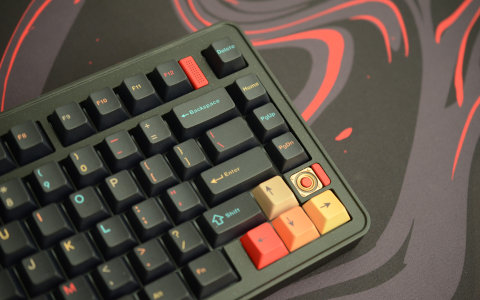
Evoworks Evo75 review
The Evoworks Evo75 is an elegant 75% tri-mode wireless keyboard with ball-catch and leaf-spring structure, coming in a multitude of beautiful variants. Meticulously designed and tuned for an exceptional out-of-the-box typing experience.